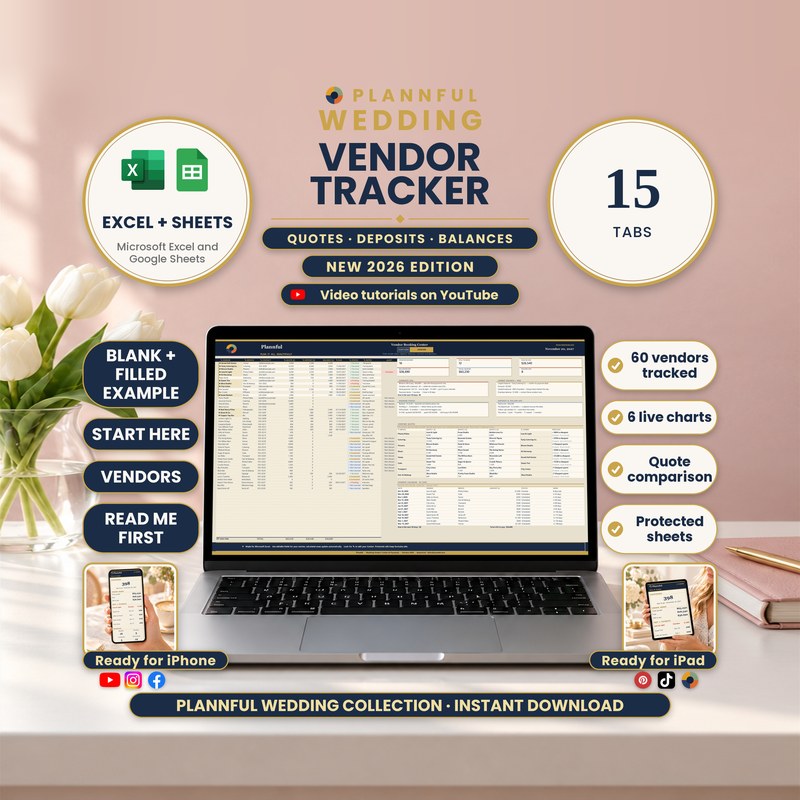
Real screenshots of the sheets.
Weddings
Wedding Vendor Tracker & Payments
Every wedding vendor, quote, deposit and payment in one 15-tab spreadsheet, for Microsoft Excel and Google Sheets.
- New · the first template of the Plannful Wedding Collection
- Two programs: Excel and Sheets
- Instant download
$6.99
Instant download
- Instant download
- Two programs in one download: Excel and Google Sheets
- A 36-minute full walkthrough and a short video for every tab
- Benchmarked against the top-ranked Etsy templates in its category before release
Read Me First guide included — a short guide to the whole download.
Microsoft ExcelGoogle Sheets
- Up to 60 vendors, each with up to 4 dated payments on top of the deposit; 60 dated payments listed by date and a month-by-month view of 24 months
- Compare up to 5 quotes in each of 12 categories, with a value score out of 100
- An ALERT column flags payments that are overdue or due in 30 days
- 6 live charts, 7 contract points per vendor and a printable Vendor Card
- Two programs, one download: Microsoft Excel and Google Sheets; a BLANK and a filled example of each
- Formulas are protected (no password); cells marked with a pencil are yours to edit
This is a digital spreadsheet template — no physical product is shipped.
What's included
Read Me First (PDF, 3 pages): where to start
Folder "1 - Microsoft Excel": BLANK, FILLED EXAMPLE (a sample wedding with 44 vendors, 16 booked) and FILLED EXAMPLE 2 - Large Wedding (46 vendors, 20 booked)
Folder "Color variants": the BLANK in Sage, Teal, Plum and Charcoal (the main BLANK is navy and gold)
Folder "2 - Google Sheets": a one-page PDF with two links that copy the BLANK and the FILLED EXAMPLE into your own Google Drive
The Buyer Guide (PDF, 36 pages) as a separate download: every tab, 3 sample weddings and a FAQ
Your 15 tabs
- Start HereYour names, wedding date and currency, plus the list of tabs.
- On the goA one-column view for an iPhone held upright: countdown, totals, your next 5 payments and the next 5 deliverables.
- VendorsUp to 60 vendors with quote, deposit, balance, due date, status and an ALERT column; live totals on top.
- Payment PlanSplit each vendor's balance into up to 4 dated payments on top of the deposit and tick each one as paid.
- Quote Comparison12 categories with up to 5 quotes each, a value score out of 100 and a verdict: cheapest, best rated, best value.
- Payment CalendarEvery payment by date (up to 60) with status and days left, a month-by-month view and 2 charts.
- Contracts & ContactsPhone, email and website for each vendor and a 7-point contract checklist.
- Vendor CardPick a vendor and print a one-page summary with contact, money, payment plan and next action.
- Vendor Questions10 vendor types with 10 questions each, plus 8 questions for every vendor and 6 red flags.
- Vendor InterviewsWrite the answers of up to 3 vendors side by side for each of the 10 vendor types and mark your pick.
- Tipping Guide11 services with the usual range, when to give the tip and suggested low and high amounts.
- Day-of Vendor SheetBooked vendors in order of arrival with day-of contact, set-up, what to pay and the tip. Prints on 2 pages.
- Deliverables & Deadlines40 rows for what each vendor must send or confirm, with date, status and alerts.
- Vendor Charts4 live charts: spend by service, paid vs still to pay, payments due by month, vendors by status.
- InstructionsA feature finder with links to every part of the tracker, a 10-step workflow and 12 "I want to..." guides.
Video tutorials: the full walkthrough and every tab
A 36-minute full walkthrough (Excel & Google Sheets) and a short video for each of the 15 tabs: 16 videos in one public YouTube playlist.
How it works
- On Start Here, add your names, wedding date and currency.
- On Vendors, add each vendor with the quote, deposit and status; split the balance on Payment Plan.
- Compare quotes, tick each payment as paid and watch the balances, alerts and next payment update.
Who it's for
- Couples planning their own wedding who are comparing and paying several vendors
- Anyone who wants every quote, deposit, balance and due date in one clear file
Specifications
| Versions | Microsoft Excel (.xlsx) · Google Sheets |
|---|---|
| Microsoft Excel | On Windows or Mac, and in the Excel app on iPhone and iPad. Read Me First gives the minimum version. You get a BLANK, two filled examples and four color variants (.xlsx). No macros. |
| Google Sheets | You get two links in a guide (PDF); each one makes your own copy in Google Drive. You need a free Google account. |
| Macros | None in the Excel files |
| Delivery | Instant digital download |
| Tabs / sections | 15 working screens + 1 hidden reference sheet |
| Example data | FILLED EXAMPLE (44 vendors) and FILLED EXAMPLE 2 (46 vendors), next to the empty BLANK |
| Instructions | Start Here and Instructions tabs, Read Me First, the 36-page Buyer Guide and video tutorials |
Questions & answers
Which programs does it work in?
Microsoft Excel on a computer, the Excel app on iPhone and iPad, and Google Sheets (with a free Google account).
Can I use it on my phone or tablet?
Yes, in the Excel app on iPhone and iPad. The On the go tab is made for an iPhone held upright; the wide tabs are easier on a computer or iPad.
How many vendors can I track?
Up to 60 (the large sample wedding has 46).
Can I split a balance into several payments?
Yes. Payment Plan takes up to 4 dated payments per vendor on top of the deposit.
How many quotes can I compare?
Up to 5 per category in Quote Comparison, across 12 categories.
How do I get the Google Sheets version?
The PDF in the Google Sheets folder has two links, one for the blank tracker and one for a filled example. Each link makes your own copy in your Google Drive. FILLED EXAMPLE 2 and the color variants are Excel files.
Does changing the currency convert my amounts?
No. The currency symbol changes only the symbol. HOME CURRENCY shows your totals in a second currency, using the rate you type.
Can I edit it?
Yes. You type in the cells marked with a pencil. Calculated cells are protected with no password, and sorting and filtering are turned off on purpose so your formulas stay linked to the right rows.
Does it print?
Yes. In Excel it is set up for US Letter; in Google Sheets you choose the print settings when you print. Dates are in English.
Are there video tutorials?
Yes: a 36-minute full walkthrough (Excel & Google Sheets) and a short video for each of the 15 tabs, 16 videos in a public YouTube playlist.
Do I need an internet connection?
The Excel files work offline. Google Sheets needs an internet connection.
Is this part of the Plannful Wedding Collection?
Yes. It is part of the Plannful Wedding Collection. It goes deeper on vendors and payments, with its own 15 tabs, and works on its own. It is the first template of the collection; more planning templates are on the way.
How do I get help?
Email hello@plannful.com or message us on Etsy. The 36-page Buyer Guide covers every tab and has its own FAQ.
What do I get and how?
An instant digital download, no physical item is shipped. After checkout you can download the ZIP file straight away from your Etsy Purchases page.