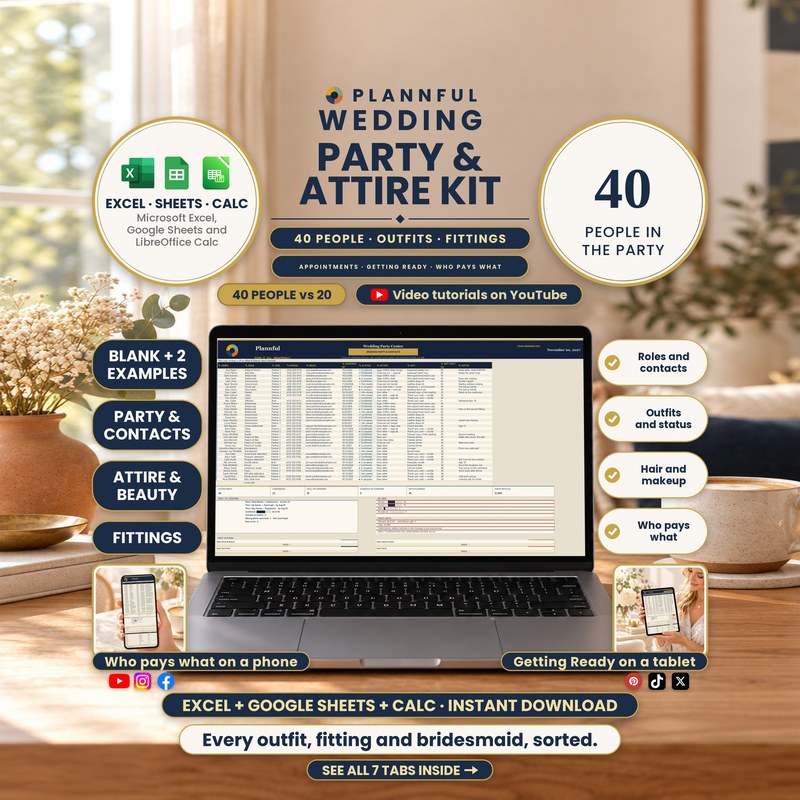
Real screenshots of the sheets.
Weddings
Wedding Party & Attire Kit
Every outfit, fitting and bridesmaid, sorted: your people, their outfits and every fitting in one workbook for Microsoft Excel, Google Sheets or LibreOffice Calc.
- Three programs: Excel, Sheets and Calc
- Instant download
$8.99
Instant download
- Instant download
- Three programs in one download: Excel, Google Sheets and LibreOffice Calc
- Read Me First guide with a Start Checklist
Read Me First guide included — where to start, a checklist and what is inside each sheet.
Microsoft ExcelGoogle SheetsLibreOffice Calc
- Up to 40 people in the wedding party, with confirm-by dates
- 100 rows of outfits and beauty items and 100 rows of appointments
- A hair and makeup morning schedule of up to 24 bookings, with an overlap check
- Who Pays What for up to 40 people and 10 group expenses
- 2 filled examples
- Works in Microsoft Excel, Google Sheets and LibreOffice Calc
- Works in any currency: pick one on Setup
- Formulas are protected (no password); cells marked with a pencil are yours to edit
This is a digital spreadsheet template — no physical product is shipped.
What's included
Read Me First (PDF, 3 pages): where to start, a Start Checklist and what is inside each sheet
Folder "1 - Microsoft Excel": BLANK (your planner, empty), FILLED EXAMPLE (a sample wedding party) and FILLED EXAMPLE 2 - Large Wedding
Folder "2 - Google Sheets": a one-page PDF with three links that copy the BLANK and the two examples into your own Google Drive
Folder "3 - LibreOffice Calc": the same three workbooks as .ods files
Your 7 sheets
- Start HereThree steps to get going, what is inside, and your setup status.
- SetupNames, wedding date and currency; dropdown options.
- Wedding Party & ContactsUp to 40 people with role, side, phone, email, confirm-by date, status, attire and gift; it counts who is confirmed, who is still to confirm and who is overdue.
- Attire & BeautyOutfits and beauty items by person (100 rows), with the store or pro, ready-by date, status and cost.
- AppointmentsFittings, tastings and visits (100 rows) by type and who they are with, with dates, status and fees.
- Getting ReadyThe morning schedule for hair and makeup: type each start time and the minutes each person needs; it works out the end time and flags two bookings with the same artist that overlap (24 rows).
- Who Pays WhatUp to 40 people: attire plus an equal share of up to 10 group expenses, what each has paid or fronted, and the balance.
Plannful on YouTube
How it works
- On Setup, add your names, wedding date and currency.
- On Wedding Party & Contacts, list your people with their role, confirm-by date and attire.
- Track outfits, fittings and the hair and makeup morning, then check Who Pays What.
Who it's for
- Couples with a wedding party who want every person, outfit and fitting in one place
- Anyone organizing bridesmaids, groomsmen, fittings and the getting-ready morning
Specifications
| Versions | Microsoft Excel (.xlsx) · Google Sheets · LibreOffice Calc (.ods) |
|---|---|
| Microsoft Excel | On Windows or Mac. You get a BLANK and two filled examples (.xlsx). No macros. |
| Google Sheets | You get three links in a guide (PDF); each one makes your own copy in Google Drive. You need a free Google account. |
| LibreOffice Calc | Free, on Windows, Mac or Linux, offline. You get the same three workbooks as .ods files. |
| Delivery | Instant digital download |
| Tabs / sections | 7 sheets |
| Capacity | 40 people · 100 outfit and beauty rows · 100 appointment rows · 24 getting-ready bookings · 10 group expenses |
| Example data | FILLED EXAMPLE and FILLED EXAMPLE 2 - Large Wedding, next to the empty BLANK |
Questions & answers
Which programs does it work in?
Microsoft Excel on a computer, Google Sheets (with a free Google account) and LibreOffice Calc (free, on Windows, Mac or Linux). Apple Numbers is not supported.
How many people can I list?
Up to 40 in the wedding party, with role, side, contact details and a confirm-by date; it counts who is confirmed and who is overdue.
Does it help with the hair and makeup morning?
Yes. Getting Ready works out each end time from the start time and minutes, and flags two bookings with the same artist that overlap.
Can it show who pays what?
Yes. Who Pays What adds each person's attire to an equal share of the group expenses and shows the balance.
How do I get help?
Send us a message here on Etsy or email hello@plannful.com. If something does not work, we will help.
What do I get and how?
An instant digital download, no physical item is shipped. After checkout you can download the ZIP file straight away from your Etsy Purchases page.