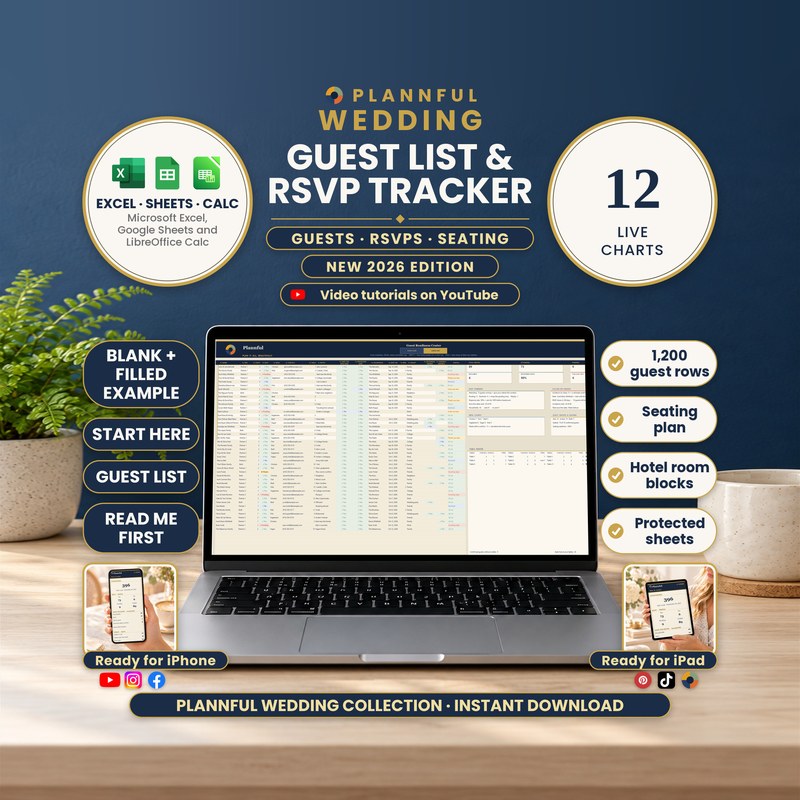
Real screenshots of the sheets.
Weddings
Wedding Guest List & RSVP Tracker
Every guest, every reply, every seat. One spreadsheet for Microsoft Excel, Google Sheets and LibreOffice Calc that counts RSVPs, meals and seats in people, builds a table-by-table seating plan and reminds you who still needs a thank-you note.
- Three programs: Excel, Sheets and Calc
- Instant download
$6.99
Instant download
- Instant download
- Three programs in one download: Excel, Google Sheets and LibreOffice Calc
- A step-by-step Buyer Guide (PDF, 41 pages) with every tab explained
Read Me First guide included — a short guide to the whole download.
Microsoft ExcelGoogle SheetsLibreOffice Calc
- Room for 1,200 guest rows (one guest or a whole party per row) and 100 tables with 1 to 30 seats each
- RSVPs, meals and seats counted in people, with a RSVP BY countdown and a list of who to chase first
- A table-by-table seating plan that builds itself from the TABLE column, ready to print on US Letter
- Food Needs for your caterer: 9 needs, with counts by type and by table
- Hotels: up to 3 room blocks with group rate, booking code and cut-off date, and who stays where
- Addresses & Gifts, address labels (30 per US Letter page) and a thank-you queue
- 12 live charts, 14 live panels and a NEEDS ATTENTION list with 8 checks
- Works in Microsoft Excel, Google Sheets and LibreOffice Calc
- Formulas are protected (no password); cells marked with a pencil are yours to edit
This is a digital spreadsheet template — no physical product is shipped.
What's included
Read Me First (PDF, 3 pages): where to start
Folder "1 - Microsoft Excel": BLANK (your tracker, empty), FILLED EXAMPLE (a sample wedding with 44 rows and 89 guests) and FILLED EXAMPLE 2 - Large Wedding (125 rows and 242 guests)
Folder "Color variants": the BLANK in Sage, Teal, Plum and Charcoal (the main BLANK is navy and gold)
Folder "2 - Google Sheets": a one-page PDF with two links that copy the BLANK and the FILLED EXAMPLE into your own Google Drive
Folder "3 - LibreOffice Calc": the same tracker as .ods files (BLANK, FILLED EXAMPLE, FILLED EXAMPLE 2 and the 4 color variants) with a short LibreOffice Calc Guide
The Buyer Guide (PDF, 41 pages) as a separate download: a step-by-step guide to every tab, with a FAQ
Your 11 tabs
- Start HereYour names, wedding date, guest target, RSVP BY date, two extra events and a currency choice, plus a GO TO list that opens every tab.
- On the goA one-column tab for your phone: countdown, RSVPs in people, save-the-dates by household, tables and free seats, and special meals.
- Guest List1,200 rows with side, party size, RSVP, meal, contact, table and notes; totals, an RSVP summary, follow-ups and a table roster with a seating plan.
- Guest Insights14 live panels, a NEEDS ATTENTION list, a catering estimate, mailings sent and still to send, and a room block for up to 3 hotels.
- Guest ChartsThe live charts of your guest list: RSVP responses, meals, seats per table, contact details, mailing addresses and gifts with thank-yous.
- Addresses & GiftsA mailing address, gift, gift value and thank-you check mark for every guest, with a thank-you queue and gifts by side.
- Food NeedsA food need and details for each guest, with one line for your caterer, each guest with a need and their table, and the needs at each table.
- HotelsA hotel for each guest, group rates and booking codes, guests per hotel, who stays where and the book-by date of each hotel.
- EnvelopesEvery complete address as a three-line label, 30 per US Letter page, with the pages to print and who has no label yet.
- BonusFour tools: a mailing timeline, seating rules, trimming the list by priority A, B or C, and thank-you wording for 6 kinds of gift.
- InstructionsFIND A FEATURE in one click, the recommended workflow, what to edit and what a red cell or amber row means.
Video tutorials: the full walkthrough and every tab
A full walkthrough plus a short video for each part of the tracker: 10 videos in one public YouTube playlist.
How it works
- On Start Here, add your names, wedding date, guest target, RSVP BY date and currency.
- On Guest List, type each guest or party once: side, party size, RSVP, meal, contact and table.
- Read the totals, the seating plan, Food Needs and Hotels as they fill in, then print your address labels and thank-you queue.
Who it's for
- Couples planning their own wedding who want every guest, reply, meal and seat in one place
- Anyone who wants RSVPs, tables, hotels, addresses and thank-you notes in one clear file
Specifications
| Versions | Microsoft Excel (.xlsx) · Google Sheets · LibreOffice Calc (.ods) |
|---|---|
| Microsoft Excel | On Windows or Mac, and in the Excel app on iPhone and iPad. You get a BLANK, two filled examples and four color variants (.xlsx). No macros. |
| Google Sheets | You get two links in a guide (PDF); each one makes your own copy in Google Drive. You need a free Google account. |
| LibreOffice Calc | Free, on Windows, Mac or Linux, offline. You get the same tracker as .ods files (BLANK, two filled examples and four color variants) with a short guide. |
| Macros | None in the Excel and LibreOffice Calc files |
| Delivery | Instant digital download |
| Tabs / sections | 11 tabs |
| Capacity | 1,200 guest rows · 100 tables · 1 to 30 seats per table · 3 hotel room blocks |
| Example data | FILLED EXAMPLE (44 rows, 89 guests) and FILLED EXAMPLE 2 (125 rows, 242 guests), next to the empty BLANK |
| Instructions | Start Here and Instructions tabs, Read Me First and the 41-page Buyer Guide |
Questions & answers
Which programs does it work in?
Microsoft Excel on a computer, the Excel app on iPhone and iPad, Google Sheets (with a free Google account) and LibreOffice Calc (free, on Windows, Mac or Linux). Apple Numbers is not supported.
How many guests can I add?
1,200 guest rows and 100 tables. A row can be one guest or a whole party, so 1,200 rows hold well over 1,200 people (the large sample wedding has 125 rows and 242 guests).
How many seats per table?
You choose: any whole number from 1 to 30. It starts at 8.
How do I add a plus-one?
Keep them on one row and set PARTY to 2: every count is in people, so the plus-one is in the headcount, the meals and the table without a second row. For children, type how many in KIDS.
Can I drag guests around the seating plan?
No. You type a table number for each guest and the plan builds itself, table by table, with the names at each table. It is a list per table, not a drawing of the room.
Can I keep track of hotel room blocks?
Yes, for up to 3 hotels: rooms held, rooms booked, cut-off date, group rate and booking code, plus which guest stays where and how many people stay at each hotel.
Can I record allergies and diets?
Yes. Food Needs takes one need and details for each guest and gives you the counts for your caterer, by type and by table.
Can I use it on my phone or tablet?
Yes, in the Excel app on iPhone and iPad. The On the go tab is made for an iPhone held upright; the wide tabs are easier on a computer or iPad. There is no Calc app for iPhone or iPad.
Does changing the currency convert my amounts?
No. The currency symbol changes only the symbol. HOME CURRENCY shows your gift total in a second currency, using the rate you type.
Can I edit it?
Yes. You type in the cells marked with a pencil. Calculated cells are protected with no password, and sorting and filtering are turned off on purpose so your formulas stay linked to the right rows.
Does it print?
Yes. In Excel and LibreOffice Calc it is set up for US Letter; in Google Sheets you choose the print settings when you print. Dates are in English (month/day/year).
How do I get help?
We usually reply within a few hours, 7 days a week. Message us on Etsy or email hello@plannful.com. The 41-page Buyer Guide covers every tab and has its own FAQ.
What do I get and how?
An instant digital download, no physical item is shipped. After checkout you can download the ZIP file straight away from your Etsy Purchases page.