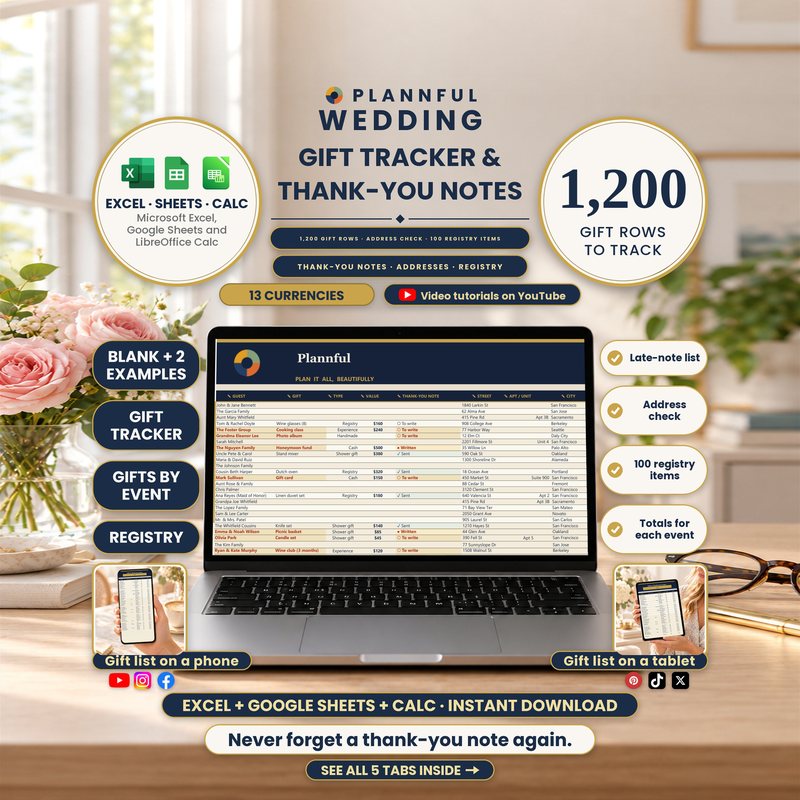
Real screenshots of the sheets.
Weddings
Wedding Gift Tracker & Thank-You Notes
Know who gave what and never forget a thank-you: every gift, its value and its thank-you note in one workbook.
- Three programs: Excel, Sheets and Calc
- Instant download
$8.99
Instant download
- Instant download
- Read Me First guide included
Read Me First guide included — where to start, a checklist and what is inside each sheet.
Microsoft ExcelGoogle SheetsLibreOffice Calc
- 1,200 rows, one per guest, each with the gift, its value and when it arrived
- Thank-you note and mailing address tracked until the note is sent
- Up to 100 registry items by room and store, with a total value
- Gifts, value and thank-yous added up for each event you pick
- 2 filled examples: 57 guest rows with 23 gifts received, and 133 guest rows with 65 gifts received
- Works in Microsoft Excel, Google Sheets and LibreOffice Calc
- Works in any currency: pick one on Setup
- Formulas are protected (no password); cells marked with a pencil are yours to edit
This is a digital spreadsheet template — no physical product is shipped.
What's included
Read Me First (PDF, 3 pages): where to start, a Start Checklist and what is inside each sheet.
Folder "1 - Microsoft Excel": BLANK (your planner, empty), FILLED EXAMPLE (a sample wedding with 57 guest rows and 23 gifts received) and FILLED EXAMPLE 2 - Large Wedding (a large wedding with 133 guest rows and 65 gifts received).
Folder "2 - Google Sheets": a one-page PDF with three links that copy the BLANK and the two examples into your own Google Drive.
Folder "3 - LibreOffice Calc": the same three workbooks as .ods files.
Your 5 sheets
- Start HereThree steps to get going, what is inside, and your setup status.
- SetupNames, wedding date and currency; your own notes; dropdown options.
- Gifts & Thank-youEach gift with who gave it and its value, plus the thank-you note and mailing address until it is sent (1,200 rows).
- Gifts by EventGifts, value and thank-yous added up for each event you pick.
- RegistryRegistry items by room and store, with add-by dates, status and total value (100 rows).
Plannful on YouTube
Specifications
| Versions | Microsoft Excel (.xlsx) · Google Sheets · LibreOffice Calc (.ods) |
|---|---|
| Microsoft Excel | On Windows or Mac. No macros; the files work offline. |
| Google Sheets | You need a free Google account. The three Google Sheets links copy the BLANK and both examples. |
| LibreOffice Calc | Free, on Windows, Mac or Linux, offline. You get the same workbooks as .ods files. |
| Delivery | Instant digital download |
| Tabs / sections | 5 sheets |
| Not supported | Apple Numbers |
Questions & answers
Which programs does it work in?
Microsoft Excel on a computer (Windows or Mac) and Google Sheets (with a free Google account) and LibreOffice Calc (free, on Windows, Mac or Linux). Apple Numbers is not supported.
What is inside the download?
One ZIP file: Read Me First (PDF), a Microsoft Excel folder with a BLANK and two filled examples, and a Google Sheets folder with a one-page PDF of links and a LibreOffice Calc folder with the same workbooks as .ods files.
How do I get help?
Send us a message here on Etsy or email hello@plannful.com. If something does not work, we will help.
What do I get and how?
An instant digital download, no physical item is shipped. After checkout you can download the file straight away from your Etsy Purchases page.