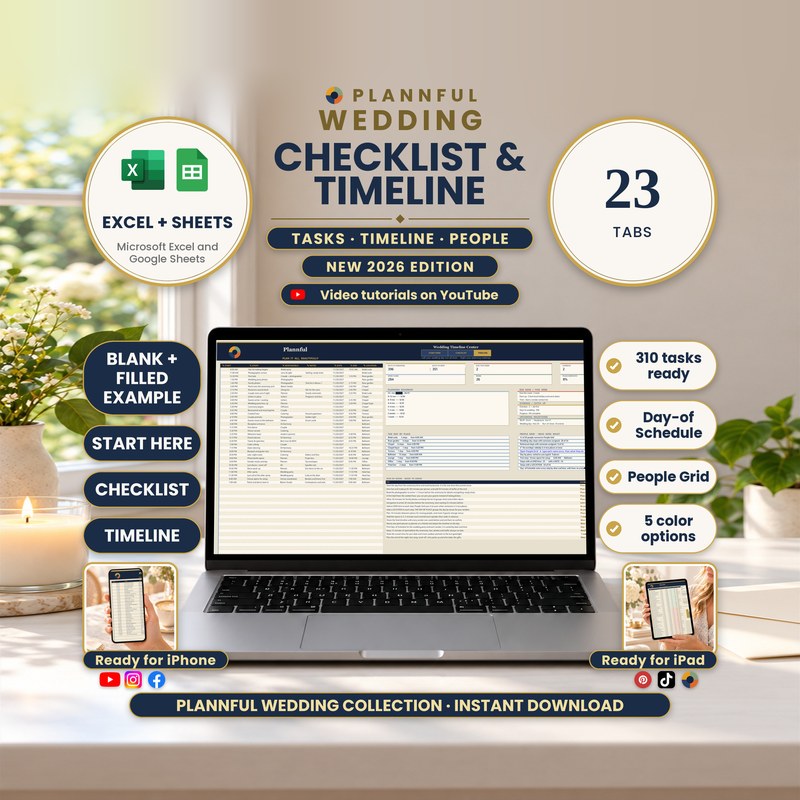
Real screenshots of the sheets.
Weddings
Wedding Checklist & Timeline
Your checklist and your wedding day in one spreadsheet for Microsoft Excel and Google Sheets. Type each task and each moment once; the progress, the charts, the day sorted by time, an hour-by-hour picture of the day, everyone's role, your vendors' arrival order, rides, speeches, music, photos and your wedding week work themselves out.
- Excel and Google Sheets
- Instant download
$14.99
Instant download
- Instant download
- Two programs in one download: Microsoft Excel and Google Sheets
- A step-by-step Buyer Guide (PDF, 26 pages) with every tab explained
- A late night is covered: steps after midnight come after your last dance
Read Me First guide included — a short guide (PDF, 4 pages) to the whole download.
Microsoft ExcelGoogle Sheets
- 310 planning tasks already written, from 12+ months out to the last week, with room for 1,000
- 25 ready-made themed lists: attire, beauty, decor, music, guests, stationery, kits, travel and more
- A Timeline of up to 100 steps, a Day-of Schedule sorted by date and time, and Day at a Glance drawing the whole day hour by hour
- People Grid: up to 20 people against every step of the day, with a warning when someone is in two places at once
- 9 day-of tabs: appointments, vendor call sheet, transport, ceremony order, speeches and toasts, music playlist, shot list, Plan B and weather, wedding week
- 5 live charts: progress by phase, month, category and person, plus the Checklist chart
- A step-by-step Buyer Guide (PDF, 26 pages) and a Read Me First (PDF, 4 pages)
- Works in Microsoft Excel and Google Sheets
- Formulas are protected (no password); cells marked with a pencil are yours to edit
This is a digital spreadsheet template — no physical product is shipped.
What's included
Read Me First (PDF, 4 pages): where to start
Folder "1 - Microsoft Excel": BLANK (your planner, with the 310 tasks ready), FILLED EXAMPLE (Alex & Jordan, a 34-step wedding day) and FILLED EXAMPLE 2 - Large Wedding (Priya & Daniel, 16 people on the day)
Folder "Color variants": the BLANK in Sage, Teal, Plum and Charcoal (the main BLANK is navy and gold)
Folder "2 - Google Sheets": a one-page PDF with two links that copy the BLANK and the FILLED EXAMPLE into your own Google Drive
The Buyer Guide (PDF, 26 pages) as a separate download: a step-by-step guide to every tab
Your 23 tabs
- Start HereYour names, wedding date and settings, plus a link that opens every tab in one click.
- Checklist310 tasks already written, grouped from 12+ months to the last week, each with WHEN, a due date you choose, DONE?, a priority and WHO does it. Room for 1,000 rows.
- ProgressCompletion by phase, by month, by category and by person, what is due this month, what is overdue and your next actions, with 4 charts.
- AppointmentsEvery tasting, fitting and meeting with who goes, date, time and place; COMING UP lists them in date order.
- TimelineYour wedding-day run of show with start, end, location and who is responsible, up to 100 steps, plus a planning roadmap and your days to the wedding.
- RehearsalYour rehearsal schedule, up to 100 steps, with its own roles.
- Day-of ScheduleThe Timeline steps sorted by date and time, and WHO DOES WHAT: pick a name and see that person's steps, ready to print for them.
- People GridUp to 20 people against every step of the day, with a warning when someone is in two places at once.
- Vendor Call SheetEach vendor's contact, phone, arrival and departure, the arrival order, the first in and last out.
- TransportEvery ride with pickup, drive time and the Timeline step it serves, and a margin that says on time, tight or late.
- Ceremony OrderThe processional with side, music and each name checked against your People Grid.
- Speeches & ToastsWho speaks when, worked out from the Timeline, with a warning if the speeches run past their slot.
- Music PlaylistSongs for each moment with its time and place, must play or do not play, and the minutes of music against the length of the slot.
- Shot ListPhotos for each moment with time and place, must have or nice to have, who gathers each group, and done.
- Plan B & WeatherPlan A from your Timeline beside plan B, who decides, by when, and ready.
- Wedding WeekThe 9 days around your wedding with their real dates, the appointments of each day and the Checklist tasks still open for the last week.
- Attire & BeautyReady-made lists for attire and beauty, with progress for each list.
- Decor & MusicReady-made lists for decor and music, with progress for each list.
- Guests & PaperReady-made lists for guests and stationery, with progress for each list.
- Kits & TravelReady-made lists for kits and travel, including an emergency kit and a honeymoon packing list.
- Day at a GlanceThe whole day drawn hour by hour, one bar per step. The grid automatically expands for a wedding day that runs late.
- InstructionsFIND A FEATURE with a link to every tab, a step-by-step workflow and what to do if something looks off.
- BonusA day-of toolkit with a must-have photo list, a vendor cue sheet, two sample wedding-day timelines and a classic order of speeches.
Video tutorials: the full walkthrough and every tab
A full walkthrough plus a short video for each of the 23 tabs: 24 videos in one public YouTube playlist.
How it works
- On Start Here, add your names and wedding date, then work through the Checklist, ticking tasks off as you go.
- On Timeline, type each moment of the wedding day once, in any order; Day-of Schedule and Day at a Glance sort them.
- Give each step a person in People Grid, then print each person's steps from Day-of Schedule.
Who it's for
- Couples planning their own wedding who want one clear checklist and one clear wedding day
- Anyone who wants to know who is where, and when, on the day itself
Specifications
| Versions | Microsoft Excel (.xlsx) · Google Sheets |
|---|---|
| Microsoft Excel | On Windows or Mac, and in the Excel app on iPhone and iPad. You get a BLANK, two filled examples and four color variants (.xlsx). No macros. |
| Google Sheets | You get two links in a guide (PDF); each one makes your own copy in Google Drive. You need a free Google account. |
| Macros | None in the Excel files |
| Delivery | Instant digital download |
| Tabs / sections | 23 tabs |
| Capacity | 310 tasks written, 1,000 Checklist rows · 100 Timeline steps · 100 Rehearsal steps · 20 people · 100 rows on each day-of tab |
| Example data | FILLED EXAMPLE (Alex & Jordan, 34-step wedding day) and FILLED EXAMPLE 2 (Priya & Daniel, 16 people), next to the BLANK |
| Instructions | Start Here and Instructions tabs, Read Me First and the 26-page Buyer Guide |
Questions & answers
Is this a full wedding planner?
No, and on purpose: all 23 tabs go deep on your checklist and your wedding day. Budget, guest list, vendors and the month-by-month calendar are separate Plannful planners.
Which programs does it work in?
Microsoft Excel on a computer, the Excel app on iPhone and iPad, and Google Sheets with a free Google account.
Do my Timeline steps have to be in time order?
No. Type them in any order: Day-of Schedule and Day at a Glance sort them.
What if our reception goes past midnight?
A time from 12:00 to 3:59 AM with no DATE counts as the night after your wedding, so it comes after the last dance everywhere: Day-of Schedule, Day at a Glance, People Grid, speeches, music, rides and the vendors' last out. A step early on the wedding morning before 4 AM just needs its DATE.
Can I give each vendor or helper their own schedule?
Yes. On Day-of Schedule, pick a name under WHO DOES WHAT and print that person's steps; Vendor Call Sheet lists every vendor's arrival and steps.
How many tasks and steps can I add?
1,000 Checklist rows (310 already written), 100 Timeline steps, 100 Rehearsal steps and 100 rows on each list tab and day-of tab.
Our engagement is shorter than a year. Does it still work?
Yes. WHEN groups the 310 tasks from 12+ months to the last week as a guide; you type each DUE date to fit your own time, and Progress, due this month and overdue follow your dates. Delete the tasks you do not need.
Can I use it on my phone or tablet?
Yes, in the Excel app on iPhone and iPad or the Google Sheets app. Ticking tasks off and reading the day work well on a phone; the wide tabs are easier on a computer or iPad.
What is different in Google Sheets?
The same 23 tabs, formulas, drop-downs, links and charts as in Excel. Protected cells show a warning instead of blocking you, fonts differ slightly, and print settings (paper, print area) are chosen when you print. FILLED EXAMPLE 2 and the color variants are Excel files.
Can I edit it?
Yes. You type in the cells marked with a pencil. Calculated cells are protected with no password, and sorting and filtering are turned off on purpose so your formulas stay linked to the right rows.
Does it print?
Yes. In Excel every tab is set up for US Letter with page numbers; in Google Sheets you choose the print settings when you print. Dates are in English (month/day/year).
How do I get help?
Send us a message on Etsy or email hello@plannful.com. The 26-page Buyer Guide covers every tab.
What do I get and how?
An instant digital download, no physical item is shipped. After checkout you can download the ZIP file straight away from your Etsy Purchases page.