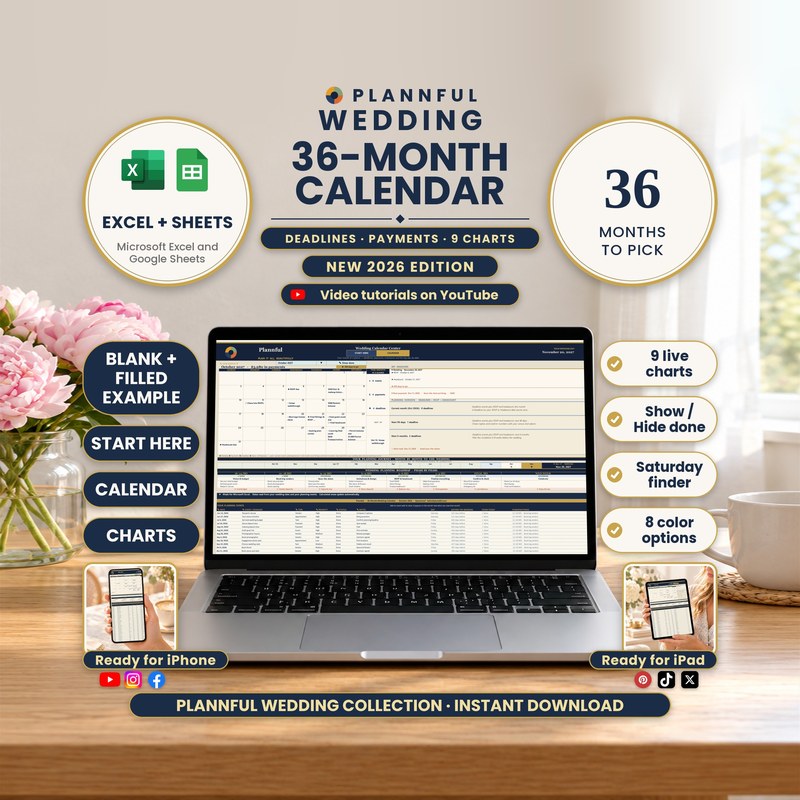
Real screenshots of the sheets.
Weddings
36-Month Wedding Calendar
Type your wedding date once and get a month-by-month calendar you can move through for 36 months, with your events, your payments (with their amounts), your key deadlines and your milestones on the days they fall. Payments and tasks come with totals and 9 live charts, a one-page Year View, 12 planning checklists and a planning roadmap, for Microsoft Excel and Google Sheets.
- Excel and Google Sheets
- Instant download
$6.99
Instant download
- Instant download
- Two programs in one download: Microsoft Excel and Google Sheets
- A step-by-step Buyer Guide (PDF, 18 pages) with every tab explained
- Eight color choices: the BLANK in navy and gold plus seven more
Read Me First guide included — a short guide (PDF, 3 pages) to the whole download.
Microsoft ExcelGoogle Sheets
- A month view for 36 months, from 32 months before your wedding to 3 months after, with the wedding day, RSVP and headcount dates, milestones, your events and your payments with their amount on the day
- Payments & Tasks with up to 100 rows, four totals (planned, paid so far, still to pay, open tasks) and a month-by-month table
- 9 live charts, including Payments by month
- Year View: twelve months on one printable page with a payment total under each month
- 12 planning checklists with 120 steps, each with a tip, and a count of steps done
- Show done / Hide done tucks away finished events, paid payments and done tasks
- Bonus 1-5, including a Saturday and holiday finder for any year
- Instructions with a find-a-feature table of 27 features, each with a link
- Three workbooks (BLANK and two FILLED EXAMPLES) and the BLANK in 8 colors
- Works in Microsoft Excel and Google Sheets
- Formulas are protected (no password); cells marked with a pencil are yours to edit
This is a digital spreadsheet template — no physical product is shipped.
What's included
Read Me First (PDF, 3 pages): where to start
Folder "1 - Microsoft Excel": BLANK (your calendar, empty and ready), FILLED EXAMPLE (a sample wedding plan, to see every part working) and FILLED EXAMPLE 2 - 12-Month Wedding (a shorter engagement)
Folder "Color variants": the BLANK in Sage, Teal, Plum, Charcoal, Burgundy, Indigo and Mocha (the main BLANK is navy and gold)
Folder "2 - Google Sheets": a one-page PDF with two links that copy the BLANK and the FILLED EXAMPLE into your own Google Drive
The Buyer Guide (PDF, 18 pages) as a separate download: a step-by-step guide to every tab
Your 8 tabs
- Start HereYour wedding date, your RSVP-by and headcount-by dates, the tracker status and a guide to every tab, with three steps to get going.
- CalendarPick a month with VIEW MONTH and see your events, the wedding day, milestones and the payments due each day with their amount, plus key deadlines, this month at a glance and Next up.
- Payments & TasksEvery dated payment and task with amount and status, up to 100 rows; payments planned, paid so far, still to pay, open tasks, month by month totals, a home currency converter and COMING UP.
- Charts9 live charts, from PAYMENTS BY MONTH and payments against a savings pace to what is still open in the next 12 weeks.
- Year ViewTwelve months on one printable page with the wedding, RSVP, headcount, events, payments and milestones colored, and the payment total under each month.
- Checklists12 ready-made lists of 10 steps, each step with a tip. Pick Done or To do and see "x of 120 steps done".
- InstructionsFIND A FEATURE with a link to every feature, step-by-step recipes and what to do if something looks off.
- BonusFive tables: what to book and when, rules of thumb for the deadlines that matter, a day-by-day wedding-week countdown, what to do after the wedding, and a Saturday and holiday finder.
Video tutorials: one for every tab
A short video for each of the 8 tabs: 8 videos in one public YouTube playlist.
How it works
- On Start Here, type your wedding date. Your RSVP-by date (45 days before) and headcount-by date (20 days before) fill in by themselves; type your own if you prefer.
- On Calendar, pick a month with VIEW MONTH. Add each dated event to the events table and each payment or task to Payments & Tasks.
- Everything else updates: the grid, the deadlines, the totals, the charts and Year View.
Who it's for
- Couples who want to see what is due, what is next and what they have paid over the months before the wedding
- Anyone who wants one calendar for dates, deadlines, payments and tasks, not a full planner
Specifications
| Versions | Microsoft Excel (.xlsx) · Google Sheets |
|---|---|
| Microsoft Excel | On Windows or Mac, and in the Excel app on iPhone and iPad. You get a BLANK, two filled examples and seven color variants (.xlsx). No macros. |
| Google Sheets | You get two links in a guide (PDF); each one makes your own copy in Google Drive. You need a free Google account. |
| Macros | None in the Excel files |
| Delivery | Instant digital download |
| Tabs / sections | 8 tabs · 9 charts · 8 colors |
| Capacity | 36 months · 82 rows for dated events · 100 rows for payments and tasks · 12 checklists with 120 steps |
| Example data | FILLED EXAMPLE (a sample wedding plan) and FILLED EXAMPLE 2 (a 12-month wedding), next to the BLANK |
| Instructions | Start Here and Instructions tabs, Read Me First and the 18-page Buyer Guide |
Questions & answers
Is this a full wedding planner?
No. It is a calendar: your dates, deadlines, payments and tasks over 36 months. It tracks payments with amounts, but it is not a guest list, seating chart or vendor database; those are separate Plannful planners.
Which programs does it work in?
Microsoft Excel on a computer, the Excel app on iPhone and iPad, and Google Sheets with a free Google account.
What are the 36 months?
VIEW MONTH lists 36 months: from 32 months before your wedding to 3 months after. The calendar opens on your wedding month.
Does it work if our wedding is soon, or already happened?
Yes. The month view, payments and checklists work for any date between the years 2000 and 2100. After the wedding day the countdown says how many days ago it was.
Can I enter my own RSVP and headcount dates?
Yes. They follow your wedding date (45 and 20 days before) until you type your own dates over them.
How many events, payments and tasks can I add?
82 dated events and 100 payments and tasks.
Can I use it on my phone or tablet?
Yes, in the Excel app on iPhone and iPad or the Google Sheets app. Adding a payment, setting Paid or Done and viewing the month work well; Year View and the charts are easier on a computer.
What is different in Google Sheets?
The same 8 tabs, formulas, drop-downs, links and charts as in Excel. Protected cells show a warning instead of blocking you, fonts differ slightly, PAYMENTS BY MONTH keeps 24 fixed months, the file uses New York time (the countdowns can be one day off for part of the day), and print settings are chosen when you print. The Google Sheets links copy the BLANK and the FILLED EXAMPLE; FILLED EXAMPLE 2 and the color variants are Excel files.
Can I edit it?
Yes. You type in the cells marked with a pencil. Calculated cells are protected with no password, and you can format and resize freely.
Can I find a Saturday that avoids a holiday weekend?
Yes. The Bonus tab has a Saturday and holiday finder: type a year and each month lists its Saturdays, marks the ones next to a US holiday and shows the holidays of the month.
Does it print?
Yes. In Excel the Calendar prints on US Letter (landscape) with the month grid on page 1 and the events table after it, and Year View fits on one page. Dates are in English (month/day/year).
How do I get help?
Send us a message on Etsy or email hello@plannful.com. The 18-page Buyer Guide covers every tab.
What do I get and how?
An instant digital download, no physical item is shipped. After checkout you can download the ZIP file straight away from your Etsy Purchases page.