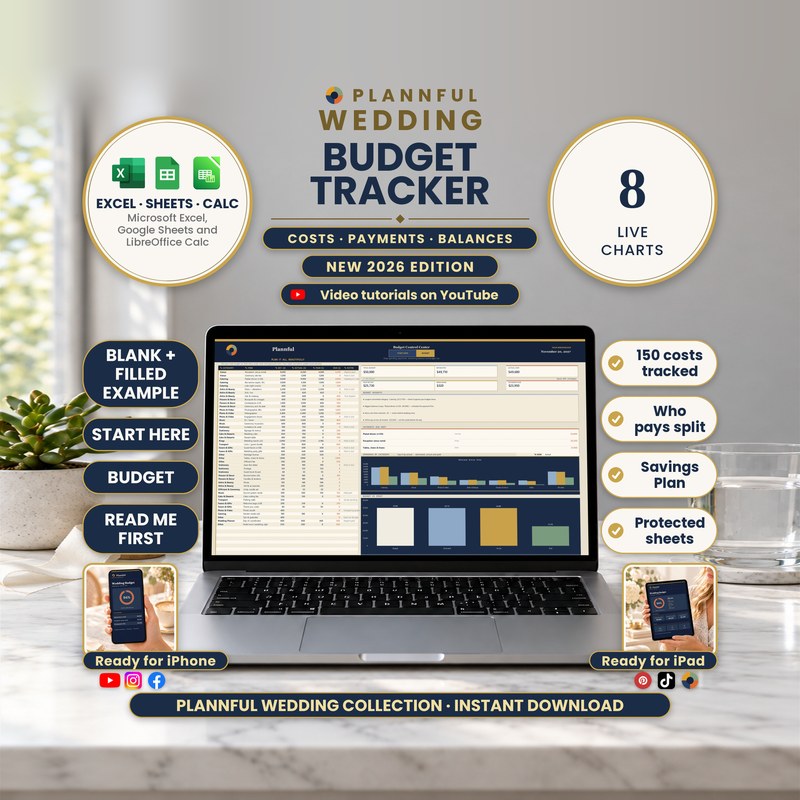
Real screenshots of the sheets.
Weddings
Wedding Budget Tracker
Where every wedding dollar goes, when each payment is due, who pays and how much to save each month. Works in Microsoft Excel, Google Sheets and LibreOffice Calc.
- Three programs: Excel, Sheets and Calc
- Instant download
$6.99
Instant download
- Instant download
- Three programs in one download: Excel, Google Sheets and LibreOffice Calc
- A step-by-step Buyer Guide (PDF, 20 pages) with every tab explained
- Benchmarked against the top-ranked Etsy templates in its category before release
Read Me First guide included — a short guide to the whole download.
Microsoft ExcelGoogle SheetsLibreOffice Calc
- Room for 150 costs, each with a category, estimate, actual cost, what you have paid and notes; what is still due is worked out for you
- 3 dated payments per cost (a deposit, a second payment and the final payment) and a month-by-month view
- Who Pays: up to 10 people, who paid each cost and who is responsible for each payment
- Savings Plan: how much to set aside each month so every dated payment is covered on time, for up to 24 months
- 8 live charts and 40 categories of your own
- Works in Microsoft Excel, Google Sheets and LibreOffice Calc
- Formulas are protected (no password); cells marked with a pencil are yours to edit
This is a digital spreadsheet template — no physical product is shipped.
What's included
Read Me First (PDF, 3 pages): where to start
Folder "1 - Microsoft Excel": BLANK (your tracker, empty), FILLED EXAMPLE (a sample wedding with 45 costs and a $50,000 budget) and FILLED EXAMPLE 2 - Large Wedding (44 costs and a $110,000 budget)
Folder "Color variants": the BLANK in Sage, Teal, Plum and Charcoal (the main BLANK is navy and gold)
Folder "2 - Google Sheets": a one-page PDF with two links that copy the BLANK and the FILLED EXAMPLE into your own Google Drive
Folder "3 - LibreOffice Calc": the same tracker as .ods files (BLANK, FILLED EXAMPLE, FILLED EXAMPLE 2 and the 4 color variants) with a short LibreOffice Calc Guide
The Buyer Guide (PDF, 20 pages) as a separate download: a step-by-step guide to every tab, with a FAQ
Your 7 tabs
- Start HereYour names, wedding date, total budget and currency, plus a home currency at your own rate.
- BudgetRoom for 150 costs with category, item, estimate, actual cost and what you have paid; six totals, budget insights and 5 live charts.
- Payment PlanSplit each cost into a deposit, a second payment and the final payment, each with a due date and a PAID? tick.
- Who PaysUp to 10 people: who paid each cost, who is responsible for each payment, and each person's share of the bill.
- Savings PlanHow much to set aside each month so every dated payment is covered on time, with a month-by-month plan and chart.
- InstructionsFind any feature in one click, step-by-step recipes for each job and what every color or warning means.
- BonusA starting split for your budget, 20 ways to save, 10 money questions to ask vendors and 12 costs couples often forget.
Video tutorials: the full walkthrough and every tab
A full walkthrough plus a short video for each tab (Start Here, Budget, Payment Plan, Who Pays, Savings Plan, Instructions and Bonus): 8 videos in one public YouTube playlist.
How it works
- On Start Here, add your names, wedding date, total budget and currency.
- On Budget, add each cost with its category, estimate and what you have paid; split it into dated payments on Payment Plan.
- Tick each payment as paid, say who pays on Who Pays, and read how much to save each month on Savings Plan.
Who it's for
- Couples planning their own wedding who want to see where every dollar goes
- Anyone who wants costs, payment dates, who pays and a savings plan in one clear file
Specifications
| Versions | Microsoft Excel (.xlsx) · Google Sheets · LibreOffice Calc (.ods) |
|---|---|
| Microsoft Excel | On Windows or Mac, and in the Excel app on iPhone and iPad. Read Me First gives the minimum version. You get a BLANK, two filled examples and four color variants (.xlsx). No macros. |
| Google Sheets | You get two links in a guide (PDF); each one makes your own copy in Google Drive. You need a free Google account. |
| LibreOffice Calc | Free, on Windows, Mac or Linux, offline. You get the same tracker as .ods files (BLANK, two filled examples and four color variants) with a short guide. |
| Macros | None in the Excel and LibreOffice Calc files |
| Delivery | Instant digital download |
| Tabs / sections | 7 tabs |
| Example data | FILLED EXAMPLE (45 costs, $50,000 budget) and FILLED EXAMPLE 2 (44 costs, $110,000 budget), next to the empty BLANK |
| Instructions | Start Here and Instructions tabs, Read Me First and the 20-page Buyer Guide |
Questions & answers
Which programs does it work in?
Microsoft Excel on a computer, the Excel app on iPhone and iPad, Google Sheets (with a free Google account) and LibreOffice Calc (free, on Windows, Mac or Linux).
Can I use it on my phone or tablet?
Yes, in the Excel app on iPhone and iPad: add a cost, tick PAID?, pick who paid and read your totals. The charts, printing and Savings Plan are best on a computer. There is no Calc app for iPhone or iPad.
How many costs can I track?
150 (the large sample wedding has 44).
Can several people share the cost?
Yes. Who Pays takes up to 10 names and shows what each person has paid and still has to pay.
Does changing the currency convert my amounts?
No. The currency symbol changes only the symbol. HOME CURRENCY shows your totals in a second currency, using the rate you type.
Can I edit it?
Yes. You type in the cells marked with a pencil. Calculated cells are protected with no password, and sorting and filtering are turned off on purpose so your formulas stay linked to the right rows.
Does it print?
Yes. In Excel and LibreOffice Calc it is set up for US Letter; in Google Sheets you choose the print settings when you print. Dates are in English (month/day/year).
How do I get the Google Sheets version?
The PDF in the Google Sheets folder has two links, one for the blank tracker and one for a filled example. Each link makes your own copy in your Google Drive. FILLED EXAMPLE 2 and the color variants are Excel files.
What is different in LibreOffice Calc?
The formulas, drop-downs, links, protection and 8 charts are the same as in Excel. Links between tabs open with Ctrl+click (Cmd+click on Mac), every tab opens at 100% zoom, and chart colors and fonts can look slightly different.
Do I need an internet connection?
The Excel and LibreOffice Calc files work offline. Google Sheets needs an internet connection.
How do I get help?
Email hello@plannful.com or message us on Etsy. The 20-page Buyer Guide covers every tab and has its own FAQ.
What do I get and how?
An instant digital download, no physical item is shipped. After checkout you can download the ZIP file straight away from your Etsy Purchases page.